Would this enable me to create a diving scenario like in Tears of the Kingdom albeit less fancy? So could I change the code to have a full top down camera view which tracks an object falling to the ground with correct scaling and depth perception as the object/player hurtles towards the ground-see attached screen for example of perspective.
Kinda? You obviously can do a falling sequence by messing with the height parameter (or simulate it with the pixel scale parameter) but you can't actually do a top-down perspective because that'd require an infinite horizon and that doesn't make any mathematical sense. So it very much depends on what you want/need, you couldn't do a F-Zero like shot that starts top-down and then rotates the camera but other kind of falling camera would work. To be honest, this is giving me an idea I could see if that could be implemented. And I assume it works with the LTS version, to be honest I haven't updated to it yet.
So like TOTK (see screenshot) but obviously without the horizon and the paragliding and other too complex things.
Going back to the first screenshot, the player (helicopter) would be hurtling towards a fixed background with a target on where they have to land on but with a realistic sense of speed and duration which could both be changed.
The example project worked with LTS.
Perhaps I should wait then if its given you update ideas?
If you just need a top-down video, with no perspective or anything, why not just use the image_xscale and image_yscale (along with image_angle) values of a simple object? You'd be confined to the top down view but there's no need to use something as fancy as this, unless you then also want the plane to "rotate" into a perspective shot.
Hey. I bought this today. It's an awesome shader! I just have a question: does this shader come with a license? Can I use this in my own games, let's say those I want to sell? I'll credit you.
I didn't think of that to be honest. I think it's fine for you to use the shader in commercial games, as long as you credit me, something like "Mode 7 Shader for GMS2 by MrLevRocks" or the like. If you have interactive/text credits that allow for it (e.g. on a website or in a browser game) feel free to make the name of the tool a link to this itch.io page, that'd be nice. Thank you for asking first!
Sorry, I completely forgot to respond to this. What do you mean jumping without distorting the entire map? I assume you adjust the height variable in the shader itself. Instead, when drawing an object, you could adjust the vertical position pos[1] by the height value scaled with the scale of it. So the line that draws the sprite in the Draw Event would look something like this: draw_sprite_ext(sprite_index, image_index, pos[0], pos[1]-height*scale, scale, scale, 0, c_white, 1); With height as the height above the ground in pixels. This should vertically displace the sprite, more the closer it is to the camera. Is this what you were after?
I'd recommend updating GameMaker Studio 2 then. I found this blog post that says this error message might come from functionality being used in the project that an older version of GMS2 does not have.
It should be possible to make billboarded sprites. That's how the car in the demo is made. But to get proper projection, the relative position of an object to the camera would have to be calculated first. There's some code already in the shader package you can buy but I didn't implement any billboarded sprites (other than the player).
Any chance you could implement billboards that are non-players, that keep their location on the floor relative to the camera? I've been tinkering with it some, but can't figure it out.
Also: how might I go about normalizing depth? I usually use depth=room_height-y, but the object doesn't draw with the shader when using that depth sorting method.
God, it's been so long since I touched this but it should be possible. I'll have to look into the code again to tell you how to calculate the relative coordinates of a billboard object so that you can place it accurately. As for depth, it should be relative to the calculated y coordinate of an object but I didn't implement it because I struggled with it myself. Should I figure it out, I could get back to you.
I have make a quick tutorial on how to make billboards using the code already included in the shader code examples. It's pretty easy, actually. https://mrlevrocks.itch.io/mode7/devlog/812974/how-to-add-billboards-to-mode-7-s... Normalizing depth might be a bit harder but what you could do is pass the calculated height from the draw event into a defined variable and then set that in the end step event. Tell me if that works.

← Return to shader
Comments
Log in with itch.io to leave a comment.
Would this enable me to create a diving scenario like in Tears of the Kingdom albeit less fancy? So could I change the code to have a full top down camera view which tracks an object falling to the ground with correct scaling and depth perception as the object/player hurtles towards the ground-see attached screen for example of perspective.
Also, does it work with the latest LTS version?
Kinda? You obviously can do a falling sequence by messing with the height parameter (or simulate it with the pixel scale parameter) but you can't actually do a top-down perspective because that'd require an infinite horizon and that doesn't make any mathematical sense. So it very much depends on what you want/need, you couldn't do a F-Zero like shot that starts top-down and then rotates the camera but other kind of falling camera would work. To be honest, this is giving me an idea I could see if that could be implemented.
And I assume it works with the LTS version, to be honest I haven't updated to it yet.
So like TOTK (see screenshot) but obviously without the horizon and the paragliding and other too complex things.
Going back to the first screenshot, the player (helicopter) would be hurtling towards a fixed background with a target on where they have to land on but with a realistic sense of speed and duration which could both be changed.
The example project worked with LTS.
Perhaps I should wait then if its given you update ideas?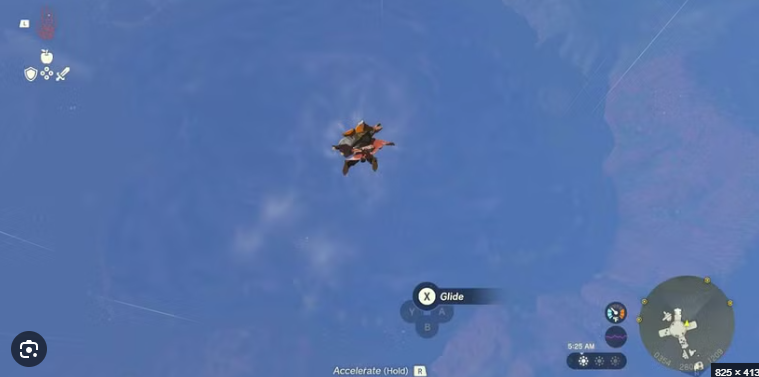
If you just need a top-down video, with no perspective or anything, why not just use the image_xscale and image_yscale (along with image_angle) values of a simple object? You'd be confined to the top down view but there's no need to use something as fancy as this, unless you then also want the plane to "rotate" into a perspective shot.
Hey. I bought this today. It's an awesome shader! I just have a question: does this shader come with a license? Can I use this in my own games, let's say those I want to sell? I'll credit you.
I didn't think of that to be honest. I think it's fine for you to use the shader in commercial games, as long as you credit me, something like "Mode 7 Shader for GMS2 by MrLevRocks" or the like. If you have interactive/text credits that allow for it (e.g. on a website or in a browser game) feel free to make the name of the tool a link to this itch.io page, that'd be nice. Thank you for asking first!
You're welcome!
so happy this exists!
I got it to load c: , im thinking about something however, it's possible to make the "player" Jump without it distorting the entire map?
Sorry, I completely forgot to respond to this.
What do you mean jumping without distorting the entire map? I assume you adjust the height variable in the shader itself. Instead, when drawing an object, you could adjust the vertical position pos[1] by the height value scaled with the scale of it. So the line that draws the sprite in the Draw Event would look something like this:
draw_sprite_ext(sprite_index, image_index, pos[0], pos[1]-height*scale, scale, scale, 0, c_white, 1);
With height as the height above the ground in pixels. This should vertically displace the sprite, more the closer it is to the camera. Is this what you were after?
whenever I try to load it, it tells me that "It's only in read mode" For some reason
I'd recommend updating GameMaker Studio 2 then. I found this blog post that says this error message might come from functionality being used in the project that an older version of GMS2 does not have.
This is great!
can we add Trees? I mean a vertical item?
It should be possible to make billboarded sprites. That's how the car in the demo is made. But to get proper projection, the relative position of an object to the camera would have to be calculated first. There's some code already in the shader package you can buy but I didn't implement any billboarded sprites (other than the player).
Any chance you could implement billboards that are non-players, that keep their location on the floor relative to the camera? I've been tinkering with it some, but can't figure it out.
Also: how might I go about normalizing depth? I usually use depth=room_height-y, but the object doesn't draw with the shader when using that depth sorting method.
God, it's been so long since I touched this but it should be possible. I'll have to look into the code again to tell you how to calculate the relative coordinates of a billboard object so that you can place it accurately.
As for depth, it should be relative to the calculated y coordinate of an object but I didn't implement it because I struggled with it myself. Should I figure it out, I could get back to you.
I have make a quick tutorial on how to make billboards using the code already included in the shader code examples. It's pretty easy, actually.
https://mrlevrocks.itch.io/mode7/devlog/812974/how-to-add-billboards-to-mode-7-s...
Normalizing depth might be a bit harder but what you could do is pass the calculated height from the draw event into a defined variable and then set that in the end step event. Tell me if that works.
Thanks for this!
It is no longer just possible, it is done. Check out this tutorial I made on how to.
https://mrlevrocks.itch.io/mode7/devlog/812974/how-to-add-billboards-to-mode-7-s...
epic